

If you’re searching for the ideal 15 inch MacBook Air configuration, you’re likely weighing options that balance power, portability, and price. The Apple MacBook Air with M2 Chip in a renewed model stands out for its strong performance at a more affordable price. The Apple 2024 MacBook Air with M3 Chip offers a newer processor with efficient performance, while the MacBook Air 2025 with M4 Chip provides a glimpse into future-proofing with the latest hardware. The main tradeoffs involve balancing RAM, storage, and chip generation against cost and intended use. Keep reading for a detailed breakdown to help you find the best fit for your needs.

Get pool and patio gear delivered free with Prime
- Fast, free delivery on millions of items
- Prime Video, Amazon Music and more included
- Member-only deals all year
Complete the kit



Key Takeaways
- The latest M5 chip models deliver the best performance for demanding tasks, but come at a higher price.
- RAM and storage configurations significantly impact both cost and multitasking capabilities—more RAM benefits power users.
- Renewed models can offer substantial savings without sacrificing much performance, ideal for budget-conscious buyers.
- Choosing the right display size and resolution depends on portability needs versus visual workspace preferences.
- Balancing future-proofing (latest chips and maximum RAM) against current budget constraints is the key to selecting the right configuration.
| Apple MacBook Air with M2 Chip (15-inch, 16GB RAM, 1TB SSD, Midnight, Renewed) |  | Best Overall | Processor: Apple M2 8-Core Chip with 10-Core GPU | Display: 15.3-inch Liquid Retina, 2880 x 1864 resolution | RAM: 16GB | VIEW ON AMAZON | See Our Full Breakdown |
| Apple 2024 MacBook Air with M3 Chip, 15-inch, 8GB RAM, 512GB SSD, Silver (Renewed) |  | Best for Battery Life and Portability | Processor: Apple M3 chip with 8-core CPU and up to 10-core GPU | Display: 15.3-inch Liquid Retina | RAM: 8GB | VIEW ON AMAZON | See Our Full Breakdown |
| Apple MacBook Air 2024 with M3 Chip (15-inch, 24GB RAM, 512GB SSD) Space Gray (Renewed) |  | Best for Heavy Multitasking and Ecosystem Integration | Processor: Apple M3 Chip (8-core CPU, up to 10-core GPU) | Display: 15.3-inch Liquid Retina | RAM: 24GB | VIEW ON AMAZON | See Our Full Breakdown |
| Apple 2023 MacBook Air Laptop with M2 Chip, 15.3-inch Liquid Retina Display, 16GB RAM, 256GB SSD, Midnight |  | Best for Silent, Fanless Performance | Processor: Apple M2 chip, 8-core CPU, 10-core GPU | Display: 15.3-inch Liquid Retina | RAM: 16GB | VIEW ON AMAZON | See Our Full Breakdown |
| Apple 2025 MacBook Air 15-inch Laptop with M4 Chip, 16GB RAM, 512GB SSD, Liquid Retina Display, Midnight | 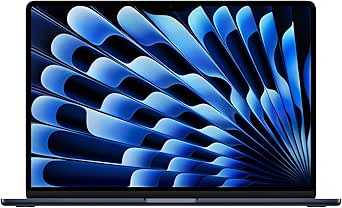 | Most Advanced Performance and Features | Processor: Apple M4 chip | Display: 15.3-inch Liquid Retina | Memory: 16GB Unified Memory | VIEW ON AMAZON | See Our Full Breakdown |
| Apple MacBook Air 15-inch with M5 Chip, 24GB Memory, 2TB SSD – Silver |  | Best Powerhouse for Heavy Multitasking and Storage | Processor: M5 chip | Memory: 24GB | Storage: 2TB SSD | VIEW ON AMAZON | See Our Full Breakdown |
| Apple MacBook Air 15-inch Laptop with M5 Chip, 32GB RAM, 1TB SSD, Liquid Retina Display, Midnight |  | Best for Creative Work and Long Battery Life | Display: 15.3-inch Liquid Retina | Processor: M5 chip | Memory: 32GB Unified Memory | VIEW ON AMAZON | See Our Full Breakdown |
| Apple MacBook Air 15-inch with M5 chip, 24GB Memory, 2TB SSD – Sky Blue |  | Best for Style-Conscious Users Who Need Performance and Portability | Screen Size: 15.2 inches | Display Type: LED | Processor: Apple M5 chip | VIEW ON AMAZON | See Our Full Breakdown |
| inch macbook air configuration | Processor | Storage | Display | Battery Life |
|---|---|---|---|---|
| Apple MacBook Air with M2 Chip | Apple M2 8-Core Chip with 10-Core GPU | 1TB SSD | 15.3-inch Liquid Retina, 2880 x 1864 resolution | — |
| Apple 2024 MacBook Air with M3 | Apple M3 chip with 8-core CPU and up to 10-core GPU | 512GB SSD | 15.3-inch Liquid Retina | Up to 18 hours |
| Apple MacBook Air 2024 with M3 | Apple M3 Chip (8-core CPU, up to 10-core GPU) | 512GB SSD | 15.3-inch Liquid Retina | Up to 18 hours |
| Apple 2023 MacBook Air Laptop | Apple M2 chip, 8-core CPU, 10-core GPU | 256GB SSD | 15.3-inch Liquid Retina | Up to 18 hours |
| Apple 2025 MacBook Air 15-inch | Apple M4 chip | 512GB SSD | 15.3-inch Liquid Retina | — |
| Apple MacBook Air 15-inch with | M5 chip | 2TB SSD | — | — |
| Apple MacBook Air 15-inch Lapt | M5 chip | 1TB SSD | 15.3-inch Liquid Retina | Up to 18 hours |
| Apple MacBook Air 15-inch with | Apple M5 chip | 2TB SSD | — | Up to 18 hours |
More Details on Our Top Picks
Apple MacBook Air with M2 Chip (15-inch, 16GB RAM, 1TB SSD, Midnight, Renewed)
This model stands out for combining the potent M2 chip with a large 15.3-inch Liquid Retina display, making it the most versatile choice for users who want high performance across tasks. Compared to the M3-based options, it offers the advantage of a more mature platform, though it comes with a higher price and limited ports. The 16GB RAM and 1TB SSD ensure smooth multitasking and ample storage, ideal for professionals and power users. The renewal status might concern some, but it often offers a more affordable entry into premium hardware. This configuration is best suited for those demanding robust performance in a portable package.
Pros:- Strong M2 chip with high-performance graphics
- Large 15.3-inch Liquid Retina display
- Ample 16GB RAM and 1TB SSD for multitasking and storage
- Lightweight and portable design
Cons:- Renewed product may have limited warranty
- Limited number of USB ports
- Higher price compared to base models
Best for: Power users and professionals who need high performance and large storage in a sleek design.
Not ideal for: Budget-conscious buyers or those preferring the latest chip architecture for future-proofing.
- Processor:Apple M2 8-Core Chip with 10-Core GPU
- Display:15.3-inch Liquid Retina, 2880 x 1864 resolution
- RAM:16GB
- Storage:1TB SSD
- Weight:3.3 pounds
- Connectivity:Wi-Fi 6 (802.11ax), Bluetooth 5.3, HDMI, 2 USB ports
Our verdict“This is the best pick for users seeking a powerful, spacious, and reliable MacBook Air with a mature platform.”
Apple 2024 MacBook Air with M3 Chip, 15-inch, 8GB RAM, 512GB SSD, Silver (Renewed)
This 2024 MacBook Air features the latest M3 chip with impressive CPU and GPU capabilities, making it a strong choice for everyday tasks and media consumption. Its 15.3-inch Liquid Retina display with a billion colors surpasses the older M2 models in vibrancy, and the battery life of up to 18 hours provides all-day productivity. Compared to the M2-based model, it offers newer connectivity options like Wi-Fi 6E and a more modern design. However, with only 8GB RAM and a renewed status, it might not be ideal for heavy multitasking or users concerned about warranty. This model is best for those prioritizing portability and battery longevity.
Pros:- Latest M3 chip with improved CPU and GPU
- Exceptional battery life of up to 18 hours
- Vivid 15.3-inch display with 1 billion colors
- Modern connectivity with Wi-Fi 6E and MagSafe
Cons:- Limited to 8GB RAM, not ideal for heavy multitasking
- Renewed product may have limited warranty
- Limited to 512GB storage for some users
Best for: Students and frequent travelers who need a lightweight device with all-day battery life.
Not ideal for: Power users requiring extensive multitasking or large local storage for large files.
- Processor:Apple M3 chip with 8-core CPU and up to 10-core GPU
- Display:15.3-inch Liquid Retina
- RAM:8GB
- Storage:512GB SSD
- Battery Life:Up to 18 hours
- Ports:Two Thunderbolt, headphone jack, MagSafe
Our verdict“This is a top choice for those seeking a lightweight, long-lasting MacBook for everyday use and media consumption.”
Apple MacBook Air 2024 with M3 Chip (15-inch, 24GB RAM, 512GB SSD) Space Gray (Renewed)
This 2024 MacBook Air with 24GB RAM excels in handling demanding multitasking, creative workflows, and seamless Apple ecosystem integration. Its M3 chip ensures robust performance, while the 15.3-inch Liquid Retina display delivers vivid visuals. Compared to models with less RAM like the 8GB version, this configuration is better suited for professional work, large projects, or running multiple apps simultaneously. The high RAM comes with a higher price tag and the limitations of a renewed product, which might concern some buyers. It’s ideal for users who need serious multitasking capability without sacrificing portability.
Pros:- Massive 24GB RAM for demanding workflows
- Powerful M3 chip with high performance
- Large, vibrant Liquid Retina display
- Seamless Apple ecosystem connection
Cons:- Premium price for a renewed product
- Limited port options for some workflows
- Higher cost compared to lower RAM models
Best for: Creative professionals and power users who need extensive RAM and smooth multitasking.
Not ideal for: Budget buyers or those with minimal multitasking needs who prefer lower-cost options.
- Processor:Apple M3 Chip (8-core CPU, up to 10-core GPU)
- Display:15.3-inch Liquid Retina
- RAM:24GB
- Storage:512GB SSD
- Battery Life:Up to 18 hours
- Ports:Two Thunderbolt, headphone jack, MagSafe
Our verdict“This is the ideal choice for users requiring maximum multitasking capacity in a portable MacBook Air.”
Apple 2023 MacBook Air Laptop with M2 Chip, 15.3-inch Liquid Retina Display, 16GB RAM, 256GB SSD, Midnight
This 2023 MacBook Air with M2 chip offers a fanless design, making it completely silent during operation—a clear advantage for quiet environments. Its 15.3-inch Liquid Retina display and 16GB RAM support smooth multitasking, though the 256GB SSD limits storage for users with large files or extensive media libraries. Compared to the newer M3 models, it provides proven performance with a mature platform, but the smaller storage and higher price for the features make it less suitable for heavy data users. It’s best for those who prioritize quiet operation and a sleek, lightweight form factor.
Pros:- Fanless, silent operation
- Large, vibrant Liquid Retina display
- Powerful M2 chip with high performance
- Lightweight and portable
Cons:- Limited to 256GB SSD storage
- No dedicated GPU options
- Higher price relative to storage capacity
Best for: Writers, students, or professionals who need a quiet device with ample screen real estate.
Not ideal for: Users with large storage needs or those who require the latest chip architecture.
- Processor:Apple M2 chip, 8-core CPU, 10-core GPU
- Display:15.3-inch Liquid Retina
- RAM:16GB
- Storage:256GB SSD
- Battery Life:Up to 18 hours
- Material:Recycled aluminum
Our verdict“This MacBook Air is perfect for users seeking a silent, portable device with a large display for everyday tasks.”
Apple 2025 MacBook Air 15-inch Laptop with M4 Chip, 16GB RAM, 512GB SSD, Liquid Retina Display, Midnight
The 2025 MacBook Air with M4 chip pushes performance boundaries, offering a 15.3-inch Liquid Retina display with vibrant colors and a 12MP Center Stage camera. Its 16GB RAM and 512GB SSD balance performance with storage, making it suitable for demanding productivity and media tasks. Compared with the M3 options, the M4 chip provides even faster processing, but the premium pricing might restrict accessibility for some. The device’s support for two Thunderbolt 4 ports enhances connectivity options, although external display support remains limited to two screens. This model is best suited for those seeking cutting-edge Apple silicon performance in a portable form.
Pros:- Latest M4 chip with exceptional speed
- Rich, vivid Liquid Retina display
- Long battery life of up to 18 hours
- High-quality 12MP camera with Center Stage
Cons:- Premium price point
- Support limited to two external displays
- Higher cost compared to previous generation
Best for: Tech enthusiasts and professional users wanting the latest performance advancements and seamless Apple ecosystem integration.
Not ideal for: Budget buyers or users needing extensive external display support beyond two screens.
- Processor:Apple M4 chip
- Display:15.3-inch Liquid Retina
- Memory:16GB Unified Memory
- Storage:512GB SSD
- Camera:12MP Center Stage
- Ports:Two Thunderbolt 4, MagSafe
Our verdict“This is the best choice for users who want the most advanced performance and features in a portable MacBook Air.”
Apple MacBook Air 15-inch with M5 Chip, 24GB Memory, 2TB SSD – Silver
This MacBook Air with the M5 chip stands out for its impressive processing speed and large memory, making it ideal for users who run demanding multitasking workflows or handle hefty files. Compared to the M3-based models, this version offers significantly faster performance and a substantial 24GB of RAM, which benefits creative professionals or engineers. Its 2TB SSD provides ample storage for large projects without external drives. However, this power comes at a premium price, and details on battery longevity remain limited. If your work involves intensive tasks and large data sets, this model offers a compelling combination of speed and capacity.
Pros:- Powerful M5 processor for fast performance
- Large 24GB memory supports heavy multitasking
- Huge 2TB SSD offers expansive storage
- Lightweight and portable design
Cons:- High price point for premium features
- Limited info on battery life may concern those needing long unplugged use
Best for: Creative professionals or power users who need maximum performance and storage in a portable package
Not ideal for: Casual users or students who prioritize lower cost or longer battery life over raw power
- Processor:M5 chip
- Memory:24GB
- Storage:2TB SSD
- Color:Silver
Our verdict“This configuration is perfect for demanding users who prioritize speed and storage, despite its premium cost.”
Apple MacBook Air 15-inch Laptop with M5 Chip, 32GB RAM, 1TB SSD, Liquid Retina Display, Midnight
This MacBook Air, featuring the M5 chip and a vibrant Liquid Retina display, makes a strong case for users who value visual quality and extended unplugged use. Its 32GB of unified memory offers smooth multitasking, especially when working with large media files or running multiple apps simultaneously. Compared with the 24GB models, this one provides more memory but slightly less storage, which might matter for users with extensive media libraries. The impressive 18-hour battery life makes it ideal for travel or long work sessions. However, the high cost and absence of a dedicated GPU mean it isn’t suited for demanding gaming or 3D workloads. For those prioritizing display quality, long battery life, and seamless Apple ecosystem integration, this is a compelling choice.
Pros:- Vivid Liquid Retina display enhances visual work
- Long-lasting battery up to 18 hours
- Powerful M5 chip with excellent multitasking ability
- Seamless Apple ecosystem integration
Cons:- Premium price makes it less accessible for budget-conscious buyers
- Limited to two external displays, restricting multi-monitor setups
- No dedicated GPU limits high-end graphics performance
Best for: Creative professionals and mobile workers seeking a high-quality display and all-day battery life
Not ideal for: Gamers or users needing dedicated graphics power for demanding 3D tasks
- Display:15.3-inch Liquid Retina
- Processor:M5 chip
- Memory:32GB Unified Memory
- Storage:1TB SSD
- Battery Life:Up to 18 hours
- Ports:Two Thunderbolt 4, MagSafe, headphone jack
Our verdict“This model suits users who want a high-quality display, long battery life, and strong performance for everyday creative tasks.”
Apple MacBook Air 15-inch with M5 chip, 24GB Memory, 2TB SSD – Sky Blue
This Sky Blue MacBook Air, powered by the M5 chip, combines sleek aesthetics with solid performance. Its 24GB of RAM supports smooth multitasking, while the 2TB SSD ensures ample storage for files and applications. The ultra-portable design, with a thickness of just 0.61 inches, makes it easy to carry and perfect for on-the-go use. Compared with the Silver version, this color option offers a vibrant, eye-catching look, but the core specs are similar, so performance remains consistent. The integrated graphics and non-upgradable RAM can be limiting for advanced gaming or demanding 3D work. Nonetheless, for users who want a stylish, lightweight machine with strong AI capabilities and long battery life, this model hits the mark.
Pros:- Striking Sky Blue color adds personality
- Strong performance with M5 chip
- Large 2TB SSD and 24GB RAM support multitasking
- Very thin and lightweight for portability
Cons:- Integrated graphics may limit demanding 3D or gaming workloads
- RAM is not upgradeable beyond 24GB, restricting future expansion
Best for: Style-conscious professionals or students who want performance in a lightweight, attractive package
Not ideal for: Power users requiring dedicated graphics or extensive upgradeability
- Screen Size:15.2 inches
- Display Type:LED
- Processor:Apple M5 chip
- Memory:24GB
- Storage:2TB SSD
- Battery Life:Up to 18 hours
Our verdict“This colorfully designed, portable option is perfect for users who prioritize style without sacrificing performance for everyday tasks.”

How We Picked
Our evaluation focused on performance, value, and versatility to help buyers find the best 15 inch MacBook Air configurations in 2026. We prioritized the latest chip generation for speed and efficiency, while also considering RAM and storage options that align with different usage profiles. Build quality, user experience, and long-term usability played key roles in our rankings. Price-to-performance ratio was also a major factor, especially for those seeking a balance between cost and capability. This approach ensures that each model on the list offers distinct advantages suited to specific needs and budgets.| inch macbook air configuration | Ports |
|---|---|
| Apple MacBook Air with M2 Chip | — |
| Apple 2024 MacBook Air with M3 | Two Thunderbolt, headphone jack, MagSafe |
| Apple MacBook Air 2024 with M3 | Two Thunderbolt, headphone jack, MagSafe |
| Apple 2023 MacBook Air Laptop | — |
| Apple 2025 MacBook Air 15-inch | Two Thunderbolt 4, MagSafe |
| Apple MacBook Air 15-inch with | — |
| Apple MacBook Air 15-inch Lapt | Two Thunderbolt 4, MagSafe, headphone jack |
| Apple MacBook Air 15-inch with | — |
Factors to Consider When Choosing 15 Inch Macbook Air Configurations
When selecting a 15 inch MacBook Air configuration, it’s important to focus on several key factors to ensure you get the best value and performance for your needs. Considering the chip generation, RAM, storage capacity, display quality, and price can help you avoid common pitfalls like underpowered specs or overspending on features you don’t need. Understanding these factors will guide you toward a configuration that balances current requirements with future longevity, making your investment worthwhile.Processor and Chip Generation
The processor is the heart of your MacBook Air, impacting everything from speed to energy efficiency. Newer chips like the M4 and M5 offer faster performance and better power management, which can be critical for demanding tasks or future-proofing. However, they also come with a higher price tag. Buyers should consider whether their workload justifies the latest chip, or if a previous generation like M2 or M3 provides sufficient power at a lower cost.
Memory (RAM)
RAM directly affects multitasking and responsiveness, especially with multiple apps or intensive workflows. For most users, 8GB is adequate for everyday tasks, but power users or those using creative software should consider 16GB or more. Higher RAM configurations also tend to increase the price, so weighing your current and future needs can prevent overspending while maintaining smooth performance.
Storage Capacity
While storage might seem straightforward, choosing the right capacity depends on usage habits. If you store large files or use applications locally, 1TB or more is beneficial. However, cloud storage integration can reduce the need for large SSDs, allowing for more budget-friendly options like 512GB. Remember, upgrading storage later on is difficult, so select a capacity that aligns with your long-term needs.
Display and Portability
The 15 inch display balances workspace and portability, but consider resolution and display quality for your use case. Liquid Retina displays offer sharper visuals and better color accuracy, ideal for creative work. Portability also involves weight and battery life; larger screens can mean more weight, so think about whether you prioritize a compact form factor or a larger viewing area for extended use.
Price and Future-Proofing
Cost is a significant factor, but investing in the latest hardware can extend your device’s relevance. Higher-priced configurations with the newest chips and maximum RAM offer better longevity, yet may be unnecessary for lighter users. Balance your budget against the need for future-proofing, and consider whether a middle-tier option provides the best value for your specific workload.
Frequently Asked Questions
Is it worth paying extra for the latest M5 chip in a 15 inch MacBook Air?
The M5 chip offers noticeable improvements in processing speed and energy efficiency, making it a strong choice for demanding tasks or future-proofing. However, if your daily use involves basic tasks like browsing, streaming, or document editing, the performance gains may not justify the higher price. Buyers should assess their workload to determine if investing in the latest chip aligns with their long-term needs.
How much RAM do I really need in a 15 inch MacBook Air?
For most users, 8GB of RAM suffices for general multitasking and everyday applications. Creative professionals or those running intensive software should consider 16GB or more to avoid performance bottlenecks. Increasing RAM can significantly improve responsiveness during demanding tasks, but it also increases the initial cost. Think about your typical workload and future needs before selecting the maximum available RAM.
Should I choose a renewed or refurbished MacBook Air to save money?
Renewed models can offer substantial savings while providing nearly the same performance as new units, especially from reputable sellers. They often undergo rigorous testing and come with warranty options. However, they may have minor cosmetic imperfections or slightly older hardware iterations. If budget is a priority, a renewed model can be a smart choice, but ensure you buy from a trusted source.
How important is storage capacity versus external cloud options?
Storage capacity determines how many files and applications you can store locally, which impacts performance and convenience. While cloud storage offers flexibility and scalability, relying solely on it can be problematic if you have inconsistent internet access or large files that need local storage. Consider your usage habits—if you work with large media files regularly, a higher SSD capacity is worthwhile, but for lighter use, cloud options may suffice.
Is a larger display worth the extra cost and weight?
A 15 inch display provides more workspace, which benefits multitasking and creative work, but it also adds to the weight and reduces portability. If you frequently commute or need a lightweight setup, consider whether a slightly smaller model might be more convenient. Conversely, if your work involves detailed visuals or multiple windows, the larger screen can significantly improve productivity and comfort.
Conclusion
For those seeking the best overall experience, the Apple MacBook Air with M5 Chip and maximum RAM makes a compelling choice, offering top-tier performance and longevity. Budget-conscious buyers aiming for great value should consider the Renewed M2 or M3 models, which deliver solid performance at a lower price point. Beginners or casual users will benefit from mid-tier options that balance features with affordability, like the M3-based configurations. Power users and creative professionals should prioritize models with higher RAM and the latest chips to future-proof their investment, while those with specific needs—such as portability or storage—should focus on display size and capacity. Ultimately, choosing the right configuration depends on your workload, budget, and long-term plans.