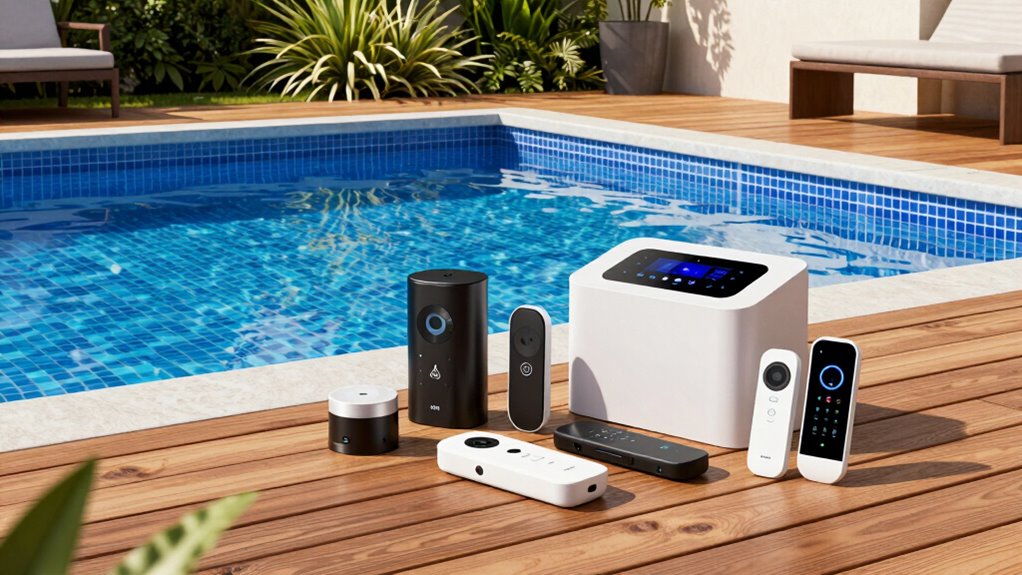

A pool automation upgrade kit can add control features to an existing setup, replace a failed component, or refresh an older system—but the right choice depends on what you already own. My best overall pick is the Pentair IntelliCenter Lite i5PS, a stronger fit for owners seeking a broader system upgrade rather than a single replacement part. The Jandy AquaLink RS Upgrade Kit suits owners staying within the RS platform, while the iAquaLink Pool and Spa Combo System Bundle stands out for app-oriented control. The main tradeoff is scope: a complete automation system offers a wider reset, while a controller, wireless interface, or circuit board may be a better match for a targeted repair. Read on for the full comparison, compatibility checks, and buyer guidance.

Get pool and patio gear delivered free — and shop member deals
- Fast, free delivery on millions of items
- Access to Prime Big Deal Days deals on October 6–7
- Prime Video, Amazon Music and more included
Complete the kit



Key Takeaways
- IntelliCenter Lite i5PS is my overall pick for buyers seeking a broader Pentair pool-and-spa system upgrade, but it is not the simplest component swap.
- The Jandy RS upgrade kits are platform-specific: the RS-PS8 and RS4 kits serve different system configurations, so matching the installed RS setup matters more than choosing by name alone.
- iAquaLink IQ904-PS and the IQ20-A wireless interface focus on connected control, while the Pentair wireless kits add remote control within their respective system families.
- A replacement board such as R0468501 or a local display service kit can address a narrower failure, but neither should be mistaken for a full automation upgrade.
- The lineup splits into complete systems, platform upgrade kits, and individual controllers or service parts; checking the exact system model and included components should come before comparing features.
| Pentair 522048 IntelliTouch/EasyTouch i10PS Upgrade Kit |  | Best for Expanding Compatible Pentair Systems | Brand: Pentair | Model: 522048 | Compatibility: IntelliTouch and EasyTouch systems manufactured after 2012 | VIEW ON AMAZON | See Our Full Breakdown |
| Pentair IntelliCenter Lite i5PS Pool and Spa Automation System, No Breaker Panel | 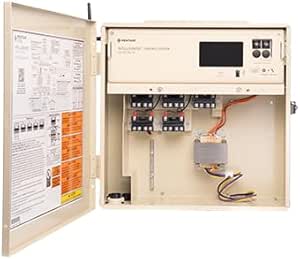 | Best for a Feature-Rich Retrofit | Brand: Pentair | Model: 523910 | Relays: 5 | VIEW ON AMAZON | See Our Full Breakdown |
| Jandy Aqualink RS Upgrade Kit with RS-PS8, IQ30-RS |  | Best for an RS-PS8 System Integration | Manufacturer: Jandy | Item model number: RS-PS8 IQ30-RS | Product dimensions: 5.8 x 5.8 x 4.5 inches | VIEW ON AMAZON | See Our Full Breakdown |
| Jandy AquaLink RS4 OneTouch Pool and Spa Upgrade Kit, Revision QQ (R0468503) |  | Best for a Focused RS4 Revision Upgrade | Manufacturer: ZODIAC POOL CARE, INC | Model: R0468503 | Compatibility: Jandy AquaLink RS4 control systems | VIEW ON AMAZON | See Our Full Breakdown |
| R0468501 Compatible with Jandy Zodiac R0468501 AquaLink RS8 P&S Power Center Board, PCB with CPU, R0466801 REV T.1/T.2 |  | Best for RS8 Board Replacement | Compatibility: Jandy Zodiac R0468501 and R0466801 REV T.1/T.2 | Application: Pool and spa automation systems | Power supply: 24V low voltage | VIEW ON AMAZON | See Our Full Breakdown |
| Jandy iAquaLink Pool and Spa Combo System Bundle (IQ904-PS) |  | Best for a Full Jandy Combo-System Upgrade | Model: IQ904-PS | Control system: Jandy AquaLink RS-PS4 with iAquaLink | Connectivity: Wi-Fi or Ethernet | VIEW ON AMAZON | See Our Full Breakdown |
| GLX-PL-LOC-P-4 Local Display Controller Service Kit for Hayward Goldline Pro Logic & AquaPlus Automation |  | Best for Replacing a Hayward Local Display | Model number: BDXSP | Compatible systems: Hayward Goldline Pro Logic PL-P-4 and AquaPlus PL-PLUS | Control capacity: Up to 16 relays, two heaters, and a solar system | VIEW ON AMAZON | See Our Full Breakdown |
| Jandy iQ20-A iAquaLink 2.0 Wireless Pool Control Interface |  | Best Jandy Wireless Add-On | Model: IQ20-A | Connectivity: Wi-Fi | Compatible systems: AquaLink RS revision R and later, PDA revision 6.0 and later, and Z4 | VIEW ON AMAZON | See Our Full Breakdown |
| Pentair 520547 EasyTouch Wireless Controller Kit for 8-Circuit Systems |  | Best for Hands-On EasyTouch Control | Model: 520547 | Compatible system: Pentair EasyTouch | Supported circuits: Up to eight auxiliary circuits | VIEW ON AMAZON | See Our Full Breakdown |
| Pentair IntelliTouch ScreenLogic Wireless Connection Kit, Model 520639 |  | Best for Completing an IntelliTouch ScreenLogic Link | Model: 520639 | Compatible system: Pentair IntelliTouch ScreenLogic | Connection purpose: Links the IntelliTouch power center to the ScreenLogic Protocol Adapter and home wireless router | VIEW ON AMAZON | See Our Full Breakdown |
| pool automation upgrade kit | Model |
|---|---|
| Pentair 522048 IntelliTouch/Ea | 522048 |
| Pentair IntelliCenter Lite i5P | 523910 |
| Jandy Aqualink RS Upgrade Kit | — |
| Jandy AquaLink RS4 OneTouch Po | R0468503 |
| R0468501 Compatible with Jandy | — |
| Jandy iAquaLink Pool and Spa C | IQ904-PS |
| GLX-PL-LOC-P-4 Local Display C | — |
| Jandy iQ20-A iAquaLink 2.0 Wir | IQ20-A |
| Pentair 520547 EasyTouch Wirel | 520547 |
| Pentair IntelliTouch ScreenLog | 520639 |
More Details on Our Top Picks
Pentair 522048 IntelliTouch/EasyTouch i10PS Upgrade Kit
For owners of a compatible Pentair system who need more controlled equipment, this kit adds an i10PS personality board supporting up to ten circuits. It is a targeted upgrade to an existing IntelliTouch or EasyTouch enclosure, rather than a full control-system replacement like the Pentair IntelliCenter Lite i5PS. That makes it a better fit when the current system is worth keeping and circuit capacity is the main gap; the i5PS is the broader option for buyers seeking a touchscreen and included valves and sensors. Pentair supplies connectors and mounting hardware, but the stated compatibility is limited to systems made after 2012. Product information also offers little installation guidance, so I would not treat the hardware as a plug-and-play choice without confirming the exact controller and installation requirements.
Pros:- Adds support for up to ten circuits to compatible existing systems
- Includes connectors and mounting hardware
- Designed to fit an existing automation enclosure
Cons:- Compatibility is specified only for IntelliTouch and EasyTouch systems manufactured after 2012
- Product details do not provide a detailed installation procedure
Best for: Owners of Pentair IntelliTouch or EasyTouch systems manufactured after 2012 who need control for up to ten circuits without replacing the existing enclosure.
Not ideal for: Owners of older or non-Pentair systems, or buyers who need a new automation interface, wireless features, or detailed installation instructions.
- Brand:Pentair
- Model:522048
- Compatibility:IntelliTouch and EasyTouch systems manufactured after 2012
- Configuration:i10PS common personality board
- Circuit capacity:Up to 10 circuits
- Included components:Circuit board, connectors, and mounting hardware
- Product dimensions:20 x 18 x 6 inches
Our verdict“Choose this kit when a compatible Pentair system needs more circuit capacity and you want to retain its existing enclosure.”
Pentair IntelliCenter Lite i5PS Pool and Spa Automation System, No Breaker Panel
The IntelliCenter Lite i5PS is the strongest choice here for a buyer replacing or expanding pool-and-spa controls who also wants an onboard interface. Its color touchscreen, five relays, Wi-Fi antenna, two actuator valves, and water and air sensors make it a more complete system package than the Pentair 522048, which adds circuit capacity to compatible existing controls but does not supply this set of interface and sensing components. The tradeoff is that this is a system-level retrofit, not a small board upgrade, and its power center has no breaker panel. Buyers planning a retrofit need to account for that omission and check their electrical setup. Optional 900 MHz wireless control is sold separately, so the included Wi-Fi antenna should not be mistaken for every form of remote control.
Pros:- Automates pools and pool-and-spa combinations
- Provides five relays for connected equipment
- Includes a color touchscreen and Wi-Fi antenna
- Includes two actuator valves and water and air temperature sensors
Cons:- Power center does not include a breaker panel
- Optional 900 MHz wireless control is sold separately
- A larger system retrofit may be unnecessary for buyers who only need a board upgrade
Best for: Pool-and-spa owners planning a Pentair automation retrofit who want a touchscreen, five relays, actuator valves, and temperature sensors in one system package.
Not ideal for: Owners seeking only a replacement board or circuit expansion, or buyers whose installation requires a power center with an included breaker panel.
- Brand:Pentair
- Model:523910
- Relays:5
- Included components:2 actuator valves, Wi-Fi antenna, water and air temperature sensors
- Breaker panel:Not included
- Material:Metal or metal alloy
- Dimensions:16 x 5 x 30 inches
- Weight:7 pounds
Our verdict“Pick the IntelliCenter Lite i5PS for a broader Pentair retrofit with an onboard touchscreen and included valves and sensors, provided the breaker-panel omission suits your setup.”
Jandy Aqualink RS Upgrade Kit with RS-PS8, IQ30-RS
This Jandy kit is aimed at owners looking to integrate an RS-PS8 IQ30-RS into an existing pool-and-spa control setup. Its stated reach across pumps, heaters, lights, and other functions makes it a broader control-focused option than the Jandy AquaLink RS4 Revision QQ kit, which is specifically a revision upgrade for an existing RS4 system. That wider positioning is appealing, but the product details do not identify specific compatible equipment models or spell out the supplied hardware. I would verify the exact system match before choosing it. Installation also calls for some technical knowledge, so this is less compelling for a buyer seeking a clearly documented board swap. Its compact listed dimensions distinguish it from the much larger Pentair IntelliCenter Lite i5PS system package.
Pros:- Designed to integrate the RS-PS8 IQ30-RS with existing pool-and-spa controls
- Supports centralized control of pumps, heaters, lights, and other functions
- Compact listed dimensions compared with a full system package
Cons:- Compatibility details for specific equipment models are limited
- Installation requires some technical knowledge
- Included components and setup details are not fully described
Best for: Jandy pool-and-spa owners who need to integrate the RS-PS8 IQ30-RS and want centralized control of pumps, heaters, and lights.
Not ideal for: Buyers who cannot confirm compatibility with their particular Jandy equipment, or those seeking a fully specified kit with detailed installation guidance.
- Manufacturer:Jandy
- Item model number:RS-PS8 IQ30-RS
- Product dimensions:5.8 x 5.8 x 4.5 inches
- Item weight:2 pounds
- Application:Integration with existing pool-and-spa control systems
- Functions described:Control of pumps, heaters, lights, and more
Our verdict“Consider this kit when your existing Jandy setup matches the RS-PS8 IQ30-RS, but confirm compatibility and installation needs before buying.”
Jandy AquaLink RS4 OneTouch Pool and Spa Upgrade Kit, Revision QQ (R0468503)
For an owner of a compatible AquaLink RS4, the Revision QQ CPU board kit offers a focused way to update the existing control platform rather than replace it with a newer system. It includes a CPU board, chip, and bezel, and supports variable-speed pumps, LED lights, and Jandy Touch remote panels. Compared with the Jandy AquaLink RS Upgrade Kit with RS-PS8, IQ30-RS, this pick has a clearer, narrower fit: it is expressly for RS4 systems, while the RS-PS8 kit is framed around integration with an RS-PS8 control setup. That specificity is useful only if your controller is the right revision family. This is not a general-purpose upgrade for other AquaLink models, and its documented feature set is less expansive than the Pentair IntelliCenter Lite i5PS system retrofit.
Pros:- Upgrades compatible AquaLink RS4 systems to Revision QQ
- Supports variable-speed pumps and LED lights
- Compatible with Jandy Touch remote panels
- Includes a CPU board, chip, and bezel
Cons:- Designed specifically for existing AquaLink RS4 control systems
- Does not serve as a complete automation-system replacement
Best for: Jandy AquaLink RS4 owners who want Revision QQ support for variable-speed pumps, LED lights, or Jandy Touch remote panels.
Not ideal for: Owners of non-RS4 systems or buyers seeking a full automation-system retrofit rather than a targeted controller revision.
- Manufacturer:ZODIAC POOL CARE, INC
- Model:R0468503
- Compatibility:Jandy AquaLink RS4 control systems
- Revision:QQ
- Included components:CPU board, chip, and bezel
- Supported features:Variable-speed pumps, LED lights, and Jandy Touch remote panels
- Package dimensions:18 x 7 x 3 inches
- Item weight:1.25 pounds
Our verdict“Choose this kit only if you have a compatible AquaLink RS4 and want a targeted Revision QQ upgrade with support for listed equipment.”
R0468501 Compatible with Jandy Zodiac R0468501 AquaLink RS8 P&S Power Center Board, PCB with CPU, R0466801 REV T.1/T.2
This replacement PCB is the most repair-oriented pick in the group: it targets compatible Jandy Zodiac AquaLink RS8 power centers and is intended to restore existing pool-and-spa automation rather than add a new interface. Its non-volatile memory retains settings after a power outage, while the listed controls cover pumps, heaters, lights, actuators, and freeze protection. That makes it a more direct match for an RS8 board failure than the Jandy AquaLink RS4 Revision QQ kit, which updates a different controller family. The tradeoff is narrow compatibility: the product specifies R0468501 and R0466801 REV T.1/T.2, so model and revision matching matters. Installation is listed for a qualified technician, and indoor-only protection limits where this board is suited to be installed.
Pros:- Replaces a compatible board without replacing the entire automation system
- Non-volatile memory retains settings after power loss
- Supports filter pump, spa, heaters, lights, actuators, and freeze protection
- Includes decal labels and a bezel
Cons:- Limited to specified compatible Jandy Zodiac models and revisions
- Installation requires a qualified technician
- Listed for indoor use only
Best for: Owners of a compatible Jandy Zodiac AquaLink RS8 power center who need a replacement board that retains settings and restores pool-and-spa controls.
Not ideal for: Owners of other AquaLink models or revisions, DIY buyers without qualified installation support, and installations requiring an outdoor-use board.
- Compatibility:Jandy Zodiac R0468501 and R0466801 REV T.1/T.2
- Application:Pool and spa automation systems
- Power supply:24V low voltage
- Supported functions:Filter pump, spa, heaters, lights, actuators, and freeze protection
- Memory:Non-volatile; retains settings after power loss
- Installation:Qualified technician required; decal labels and bezel included
- Protection:Resettable fuse for surge protection
- Use location:Indoor use only
Our verdict“Choose this replacement board for a matching RS8 power center when a technician can install it in an indoor location.”
Jandy iAquaLink Pool and Spa Combo System Bundle (IQ904-PS)
For a pool-and-spa owner building out compatible Jandy automation, this bundle brings more of the required hardware together than the standalone iQ20-A wireless interface. The IQ904-PS includes a power center, control electronics, two valve actuators, four relays, and temperature sensors, then adds remote access through the iAquaLink app or web access. That combination suits buyers who need control and switching components as well as connectivity, rather than just adding wireless access to an existing setup. The tradeoff is compatibility: it requires an AquaLink RS or PDA system, and remote operation depends on a reliable Wi-Fi or Ethernet connection. Compared with the Pentair IntelliTouch ScreenLogic kit, this is a more complete Jandy-side equipment bundle, but it is not a universal retrofit for other automation platforms.
Pros:- Bundles power-center electronics, two valve actuators, four relays, and temperature sensors.
- Adds remote monitoring and control through the iAquaLink app or web access.
- Supports customizable equipment schedules and multi-language access.
Cons:- Requires a compatible AquaLink RS or PDA pool-and-spa control system.
- Remote access depends on reliable Wi-Fi or Ethernet connectivity.
Best for: Jandy AquaLink RS or PDA pool-and-spa owners who need included control hardware, valve actuation, relays, sensors, and remote access in one upgrade bundle.
Not ideal for: Owners of Pentair, Hayward, or incompatible older Jandy systems, and buyers who only need a wireless interface for an existing AquaLink setup.
- Model:IQ904-PS
- Control system:Jandy AquaLink RS-PS4 with iAquaLink
- Connectivity:Wi-Fi or Ethernet
- Compatibility:Requires an iAquaLink device and AquaLink RS or PDA pool-and-spa control system
- Included components:iAquaLink web connect device, 6612F power center enclosure, RS-PS4 power center electronics, two valve actuators, four 3 HP relays, and temperature sensors
- Dimensions:1 x 1 x 1 inches
- Weight:1 pound
Our verdict“Choose this bundle when you have a compatible Jandy pool-and-spa system and need more than a wireless add-on alone.”
GLX-PL-LOC-P-4 Local Display Controller Service Kit for Hayward Goldline Pro Logic & AquaPlus Automation
This is a focused service replacement, not a way to add app control or rebuild an automation system. Its LCD and labeled buttons restore local operation for compatible Hayward Goldline Pro Logic PL-P-4 and AquaPlus PL-PLUS panels, with control for up to 16 relays, two heaters, and a solar system. That makes it a different kind of upgrade from the Jandy IQ904-PS bundle, which supplies broader pool-and-spa control hardware and remote access. The display kit makes more sense when the existing Hayward panel is still the right platform and its local controller needs replacing. Its main drawback is the narrow compatibility window: older systems may not match, so I would verify the panel model and part number before ordering. Buyers seeking wireless scheduling or smartphone control should look instead at a compatible network interface.
Pros:- Designed for specified Hayward Goldline Pro Logic and AquaPlus automation panels.
- Labeled buttons and an LCD support direct control at the panel.
- Supports control of up to 16 relays, two heaters, and a solar system.
- Moisture-resistant construction is suited to a pool-equipment environment.
Cons:- Does not add remote app or web control.
- Compatibility with older systems may depend on an exact part-number match.
Best for: Owners of a Hayward Goldline Pro Logic PL-P-4 or AquaPlus PL-PLUS system who need to replace the local display controller while keeping the existing automation panel.
Not ideal for: Pool owners seeking a new automation platform, remote app access, or a replacement for an older Hayward panel whose part number cannot be confirmed.
- Model number:BDXSP
- Compatible systems:Hayward Goldline Pro Logic PL-P-4 and AquaPlus PL-PLUS
- Control capacity:Up to 16 relays, two heaters, and a solar system
- Display and controls:LCD screen with labeled buttons
- Construction:Moisture-resistant
- Dimensions:4.6 x 1.2 x 6.2 inches
- Weight:7.8 ounces
- Warranty:One year
Our verdict“Pick this service kit to restore local controls on a confirmed compatible Hayward panel, not to expand automation or add connectivity.”
Jandy iQ20-A iAquaLink 2.0 Wireless Pool Control Interface
When a compatible Jandy automation system already runs the equipment, the iQ20-A adds the remote-access piece without the larger hardware bundle included with the IQ904-PS. Its Wi-Fi connection lets a smartphone, tablet, or laptop manage pool and spa settings without adding a wall panel or charging base. That narrower scope is an advantage for owners who only need wireless control, but it also means this module does not replace the power center, relays, or actuators supplied in the IQ904-PS. Compatibility is limited to AquaLink RS revision R and later, PDA revision 6.0 and later, and Z4; older installations may need a PCB upgrade. I would check the system revision before buying, since this is an interface upgrade, not a general-purpose automation kit.
Pros:- Adds remote control through smartphones, tablets, or laptops.
- Connects over Wi-Fi without extra wires, wall panels, or charging bases.
- Designed to work with compatible residential routers.
- Offers a more focused wireless add-on than the broader IQ904-PS bundle.
Cons:- Works only with specified AquaLink RS, PDA, and Z4 system versions.
- Older AquaLink systems may require a PCB upgrade.
Best for: Jandy owners with a confirmed compatible AquaLink RS, PDA, or Z4 system who want smartphone or computer access without replacing their existing controls.
Not ideal for: Owners of incompatible or unverified older AquaLink systems, or anyone who needs power-center electronics, relays, actuators, or a complete pool-and-spa bundle.
- Model:IQ20-A
- Connectivity:Wi-Fi
- Compatible systems:AquaLink RS revision R and later, PDA revision 6.0 and later, and Z4
- Compatible devices:Smartphones and tablets
- Setup:Wireless setup using a smartphone, tablet, or laptop
- Channels:1
- Operating systems:Windows, iOS, and macOS
Our verdict“Choose the iQ20-A when your existing Jandy system is compatible and remote access is the missing piece.”
Pentair 520547 EasyTouch Wireless Controller Kit for 8-Circuit Systems
This kit suits EasyTouch owners who want to operate equipment from a wireless handheld controller rather than add app-based access. It handles up to eight auxiliary circuits, and its stated range of up to 300 feet can make it practical to adjust lights, a heater, or other equipment away from the automation panel. The included transceiver and LCD give it a more direct control approach than the Pentair IntelliTouch ScreenLogic wireless connection kit, which links system components for ScreenLogic use and requires separately sold parts. That distinction matters: this controller is for compatible EasyTouch systems, not a general upgrade for every Pentair installation. Its water-resistant body is suited to poolside handling, but it uses alkaline batteries, and buyers must verify EasyTouch compatibility before choosing it.
Pros:- Controls up to eight auxiliary circuits on compatible EasyTouch systems.
- Wireless range is specified up to 300 feet.
- Includes a transceiver and an LCD display.
- Water-resistant construction supports poolside use.
Cons:- Designed for compatible EasyTouch automation systems only.
- Requires alkaline batteries for operation.
Best for: EasyTouch system owners who want a dedicated handheld remote for up to eight auxiliary circuits and do not need smartphone-based control.
Not ideal for: Owners of non-EasyTouch systems or buyers who want app or web access rather than a battery-powered handheld controller.
- Model:520547
- Compatible system:Pentair EasyTouch
- Supported circuits:Up to eight auxiliary circuits
- Connectivity:Radio frequency
- Maximum range:Up to 300 feet
- Controls and display:12 buttons and an LCD display
- Water resistance:Water resistant
- Power:Alkaline batteries
Our verdict“Choose this kit for convenient handheld control of a compatible EasyTouch system when a remote is more useful than app access.”
Pentair IntelliTouch ScreenLogic Wireless Connection Kit, Model 520639
The 520639 is a connection component for a Pentair IntelliTouch ScreenLogic setup, not a standalone pool automation controller. It links the IntelliTouch power center to the ScreenLogic Protocol Adapter and home wireless router, which makes it relevant when a buyer is assembling or replacing that specific communication path. Compared with the Pentair 520547 EasyTouch handheld kit, it serves a different system and does not provide direct button-based circuit control. Its main buying condition is also its biggest drawback: the ScreenLogic Interface Kit and Protocol Adapter are sold separately. That means this kit alone will not deliver a complete wireless setup. I would choose it only after confirming the required ScreenLogic components are already available or are being sourced separately; buyers wanting an all-in-one upgrade should look at a broader automation bundle instead.
Pros:- Designed to link an IntelliTouch power center with a ScreenLogic setup.
- Provides the wireless connection component for compatible Pentair IntelliTouch installations.
- Targets a specific ScreenLogic connection need rather than adding unrelated controls.
Cons:- Requires the separately sold ScreenLogic Interface Kit and Protocol Adapter.
- Compatible with Pentair IntelliTouch ScreenLogic systems, not a general-purpose upgrade.
Best for: Pentair IntelliTouch owners who already have, or are separately purchasing, the ScreenLogic Interface Kit and Protocol Adapter and need the wireless connection component.
Not ideal for: Buyers seeking a standalone controller, a handheld remote, or a complete automation upgrade without sourcing additional ScreenLogic hardware.
- Model:520639
- Compatible system:Pentair IntelliTouch ScreenLogic
- Connection purpose:Links the IntelliTouch power center to the ScreenLogic Protocol Adapter and home wireless router
- Required components:ScreenLogic Interface Kit and Protocol Adapter, sold separately
- Dimensions:12 x 7 x 3 inches
- Weight:1.72 pounds
- Manufacturer:Pentair
Our verdict“Buy this connection kit only when completing a confirmed IntelliTouch ScreenLogic installation and the separately required components are accounted for.”

How We Picked
I ranked these options by how well each serves the specific goal implied by a pool automation upgrade: improving control without creating a compatibility mismatch or buying more hardware than the project needs. I gave the strongest placement to products that appear to offer a broader pool-and-spa upgrade path, then distinguished them from platform-specific kits, wireless interfaces, and replacement parts. I also weighed the likely setup scope, control approach, and usefulness for owners who want to preserve an existing system.
Compatibility and product scope shaped the ranking as much as feature breadth. A part number or matching brand does not prove that a kit fits a particular installed controller, so I treated model-family fit as a key buying checkpoint rather than assuming interchangeability. Narrow service components rank below fuller upgrade options for most buyers, though they can be the better choice when the existing system is sound and only one part needs attention. I did not rank by price or customer ratings.
Factors to Consider When Choosing Pool Automation Upgrade Kit
Before choosing a kit, I would start with the system already installed and the job the new hardware needs to do. Product names in this lineup cover very different projects: a complete system change, an upgrade within one controller family, a wireless add-on, or a service replacement. These checks can help prevent a mismatch and keep a targeted repair from turning into an unnecessary system overhaul.
Match the Kit to the Installed Control Platform
Write down the controller model, revision, and any power-center or board identifiers before ordering. Similar names can refer to very different hardware: an AquaLink RS kit, an RS power-center board, and an iAquaLink interface do not serve the same role. A part that fits one generation may not replace another just because the brand and product family match. Check the manufacturer’s compatibility information or ask a qualified pool technician to verify the exact combination. This step can rule out a tempting but unsuitable kit before installation begins. If the installed system’s identity is unclear, photograph the labels and existing connections for a technician rather than guessing.
Decide Whether You Need a System Upgrade or a Repair
First identify the fault or limitation you want to solve: a dead control board, lack of remote access, too few usable controls, or a broader need to refresh pool-and-spa automation. A replacement component can be a sensible response to a localized failure, but it will not automatically add capabilities that the existing system lacks. Conversely, replacing an entire platform to fix one failed display may add equipment and installation work you do not need. Compare what is included in the kit with what you already have, including the controller, power center, interface, and any required accessories. If only one component has failed, confirm that the rest of the system is healthy before choosing a whole-system upgrade.
Separate Remote Access From Control-System Replacement
Wireless and app-facing products can improve how you interact with automation, but they may depend on a compatible controller and supporting hardware. A wireless interface is not necessarily a replacement for the control system that operates pumps, lights, valves, or other equipment. Before buying, confirm which functions are controlled locally, which are available remotely, and whether the proposed interface works with your existing platform. Think about who will use the controls and where: a local display may suit a nearby equipment area, while remote access may matter more for a home where the pool is managed from indoors or away. Do not assume that the word “wireless” means every component connects directly without additional setup.
Check Pool-and-Spa Configuration and Circuit Needs
Pool-only and pool-and-spa configurations can require different control arrangements, so verify that the kit matches how the plumbing and equipment are set up. Count the devices or functions you expect the automation to manage, then compare that need with the controller’s supported configuration. A kit meant for a particular circuit count may be a poor fit if your setup has fewer needs—or if it cannot cover the equipment you plan to control. Leave room for equipment changes you already expect, but avoid buying extra capacity based only on a vague possibility. Share the equipment list with the installer so that the proposed hardware and wiring plan match the actual system.
Budget for Installation, Setup, and Future Support
The kit itself is only part of an upgrade: labor, wiring, configuration, and any extra components can affect the total project. A board or display replacement may be a narrower job than changing automation platforms, although the exact work depends on the existing installation. Ask whether the installer will configure schedules, verify equipment operation, and explain how to use the new controls after installation. Check parts availability and support for the product family, especially when extending an older system rather than replacing it. Paying for a broader kit can make sense when it resolves several limitations at once, but it is harder to justify if a compatible replacement part addresses the actual problem.
Frequently Asked Questions
Can I install a pool automation upgrade kit without replacing my existing system?
Often, yes, if the product is designed for your installed controller family and the existing system remains functional. Upgrade kits, wireless interfaces, and service parts can each extend or repair a setup, but they do not all replace the same components. Confirm the exact model and revision of your controller and power center before choosing a kit. Also check whether the product includes the hardware needed for your intended change or depends on parts you already own. If the system’s age or condition is uncertain, ask a pool automation technician to check compatibility before you order.
How do I know whether I need a complete automation system or just a replacement part?
Start by separating a specific hardware failure from a system-wide limitation. If the problem is isolated to a board, local display, or remote interface, a compatible service component may be enough. If you want to change how several pieces of equipment are controlled, or the existing platform cannot support the control features you need, a broader system upgrade may be a better match. Have the equipment list and controller identifiers checked before deciding; a small-looking fault can sometimes point to a wider issue. The right scope is the smallest compatible project that fixes the problem you actually have.
Will a wireless or app-control kit work with any pool automation system?
No. Wireless controllers and connected interfaces usually depend on a compatible automation platform, and brand alone is not a sufficient compatibility check. Verify the exact controller family, model, and revision supported by the accessory, along with any required network or connection hardware. Also confirm which functions the interface can control, since remote access may not provide every feature available at the local panel. If remote control is your main goal, ask the seller or installer to confirm the complete hardware chain before purchasing.
Should I choose a kit for a pool-and-spa system if I currently have only a pool?
Choose based on the system you have and the equipment you want to control, not on a broader label alone. A pool-and-spa configuration may include capabilities you do not need, while a pool-focused setup might not suit a later spa addition. Compare the kit’s supported configuration with your plumbing, valves, and control requirements, then account for any planned changes. Extra capacity can be useful if a real expansion is likely, but it can also add cost and setup complexity without improving today’s operation. Ask an installer to check the planned configuration before selecting the system.
What information should I gather before asking an installer to recommend a kit?
Collect clear photos of the automation panel, power center, control board labels, and any existing remote or wireless interfaces. Make a list of the equipment you want automated, such as pumps, lights, and pool-and-spa functions, and note what currently works or fails. Include the controller model and revision when visible, rather than relying on a product name from an old receipt. Tell the installer whether your goal is a repair, remote access, or a broader system change. This information helps them check compatibility and identify extra hardware or wiring needs before the work is scheduled.
Conclusion
For a broader Pentair system refresh, I recommend the IntelliCenter Lite i5PS as best overall; it is a stronger fit for an upgrade project than a single-part repair. For a Pentair owner seeking a premium connected system direction, compare that option with the IntelliTouch ScreenLogic and EasyTouch wireless controller, but verify which platform each accessory supports before choosing. My best value pick is the Jandy RS upgrade kit when it matches an existing RS setup and the project does not call for a full platform replacement. Beginners should start with a clearly defined need and a technician-confirmed compatible kit rather than selecting a board or interface by brand alone. For a focused repair, look at the R0468501 replacement board or Hayward local display service kit; for remote-control needs, compare the Jandy iAquaLink options with the Pentair wireless choices that fit your installed system.
Halloween Picks
halloween
As an affiliate, we earn on qualifying purchases.